EXAMPLE 01
The reunion
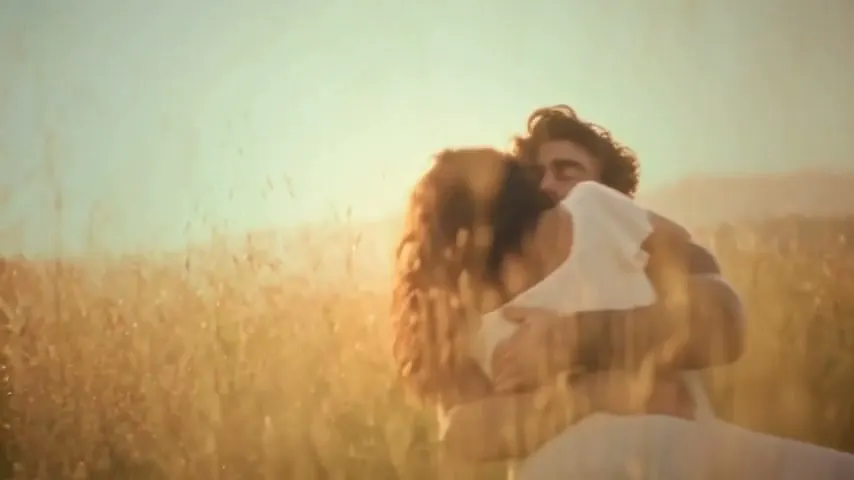
A tense encounter softens into recognition. Then, a memory of life together.
Provided example · 20.74s · 854×480 · Sound availableCurrent generator: 15s · 768P adaptationUse this template
Use our zombie love story AI video generator to turn two portraits into a frightening reunion, an embrace, and a memory of life together. Get a 15-second 768P MP4 with scene sound effects. Preview the story below, then cast yourselves in the two fixed roles.
Photo 1 stays human. Photo 2 becomes the zombie, then her human self in the memory. Add both portraits and choose your format.
JPG, PNG or WebP · max 4 MB each
A clear portrait of the male character.
JPG, PNG or WebP · max 4 MB each
A clear portrait of the female character.
Use photos you have permission to use. One-time packs, no subscription. Photo privacy · See all prices
A tense encounter. A familiar face. A memory worth keeping.
Provided example at its original length and resolution. Your video is a 15-second, 768P adaptation. Faces, movement, and framing may vary.
Each zombie couple video follows an encounter, an embrace, and a memory. Look at both characters throughout the complete example.
A tense encounter softens into recognition. Then, a memory of life together.
Provided example · 20.74s · 854×480 · Sound availableSee another pair of characters move through the hug and the warm memory.
Provided example · 20.74s · 854×480 · Sound availableA zombie love story AI video is a fictional short that puts a relationship inside a zombie scenario. In Zombie Couple Video’s version, a male survivor recognizes his female zombie partner, embraces her, and appears with her in a human memory. Two portraits guide the same couple throughout.
One person, two states: the female character shown as a zombie and the woman in the human memory should both match Photo 2. Use one ordinary portrait for her, not separate human and zombie photos. Makeup and lighting change; her identity should not. The ending looks back to life before the infection, rather than showing a cure. AI can still change her features between scenes.
These story notes describe our prepared 15-second reference. The supplied examples are demonstrations, not verified customer outcomes. Reviewed by Zombie Couple Video on .
Plan your two roles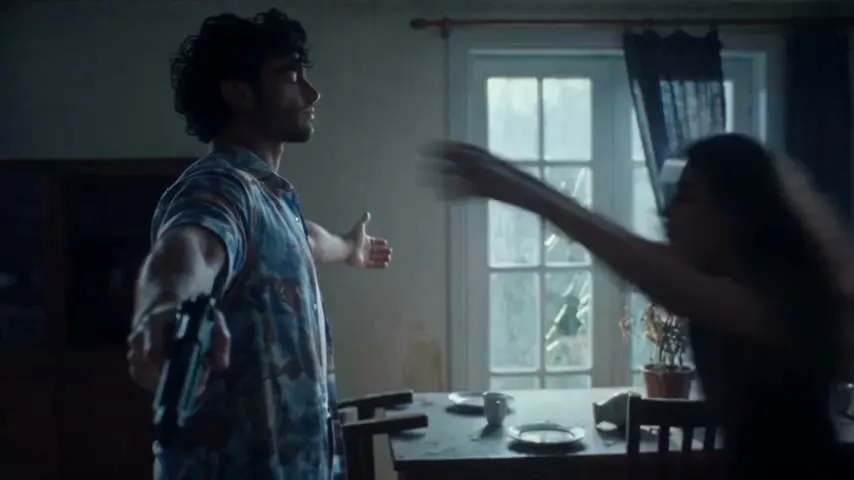
Make the familiar faces the point of the clip. Choose how you will share it before uploading, so the framing and caption fit the occasion.
Send your partner a fictional reunion with a personal note. Watch it together before posting: the zombie treatment may feel moving to one person and unsettling to another.
Preview the mood togetherUse the contrast between the eerie opening and affectionate ending. Choose vertical framing for a phone feed, then check that both faces stay visible through the embrace.
Choose your frameLet the clip finish before explaining the feeling. Try “Even here, I know you.” Add your own caption and permitted music in your sharing app; this generator supplies the story and scene effects.
Check the output detailsPhoto 1 plays the male human. Photo 2 plays the female partner in both zombie and human form. Use a separate ordinary portrait for each, with permission from both people.
For your zombie love story AI video, pick 9:16 for vertical viewing or 16:9 for landscape. Check the two role labels and the 100-credit cost. The plot is prepared; there is no prompt to write.
Play all 15 seconds, including the ending. Check the two identities, the hug, and the sound, then save the 768P MP4. Download promptly because stored files have limited retention.
The prepared story assigns the encounter and embrace to the first nine seconds. Photo 1 stays human; Photo 2 receives the zombie treatment. Start with ordinary portraits so the second face can guide both states. These are intended story timings, not a promise that every generated action lands on the same frame.
Before generating, check the two-portrait requirements. Upload labels matter: Photo 2 is both the zombie woman and the woman in the memory, rather than a separate third character.
The final six seconds are intended for the same couple in human form. For a personal edit, retain enough of this scene to recognize both faces. Cutting immediately after the hug removes the memory that explains the relationship. Add captions after checking the whole story, with text clear of the faces and their contact point.
9:16 portrait: choose a vertical frame for Reels, TikTok, or Shorts. The narrower frame leaves less room beside each person. The generator adapts the scene for portrait framing; it is not simply a crop of the landscape reference. Check that both faces, shoulders, and arms remain in view as the couple lean into the hug.
16:9 landscape: choose a wider frame when you want more room for the two people and their surroundings. It gives the embrace more horizontal space, but does not guarantee correct hands or faces. Both formats request 15 seconds at 768P for 100 credits. Choose before generating: a second format requires another paid render.
Choose this zombie love story AI video template for the encounter, embrace, and memory with your faces. You can choose portraits and framing; the characters’ roles, scene order, and ending stay fixed.
For a zombie boyfriend, another couple pairing, a pet, or a new ending, plan a custom workflow in tools that support those references. Simply swapping these uploads will not change this template’s fixed roles.
The zombie love story AI video generator can produce facial drift, awkward contact, or a broken transition even when the opening looks convincing. Check the whole clip: a changed face breaks recognition, while disconnected body positions can turn one embrace into two unrelated actions.
For example, if both faces look right but the arms jump apart at the scene change, record a transition issue rather than a wrong-face issue. Save the task ID and timestamp. A caption cannot repair broken physical contact; review the support options before paying for another render.
If the opening matches Photo 2 but the memory does not, report an identity change at the transition. If neither scene resembles Photo 2, review the source portrait first. A clearer photo may help, but does not guarantee a match.
Diagnose likeness changesIf a face or arm leaves the edge, review the framing. If hands merge or limbs bend unnaturally inside the frame, that is a generation error; switching to landscape is not a reliable fix. Save the timestamp before requesting help.
Review framing choicesA technical failure with no deliverable returns generation credits. An imperfect completed video has different support rules and no automatic satisfaction guarantee.
Check the support rulesGet permission for both portraits and let your partner review the result before sharing. Photos are processed for generation; read the policy for storage and deletion details.
Read the photo privacy policy| What to track | Encounter and embrace | Warm memory |
|---|---|---|
| Photo 1: male partner | Human survivor who recognizes his partner | The same man; a new face breaks continuity |
| Photo 2: female partner | Her identity under zombie makeup | The same woman without zombie makeup, not a third person |
| Time and place | The frightening present | A warmer past moment, not an on-screen cure |
| Physical contact | Both people move into an embrace | The hug connects the moments; check arm position and direction |
| Planned timing | Approximately 0–9 seconds of the 15-second story | Approximately 9–15 seconds; generated timing can vary |
| Audio | Scene sound effects follow the action | Scene effects continue; no particular song is promised |
One zombie couple video uses 100 credits. Every pack includes the same 15-second story, 768P download, and sound effects.
Try your first version.
100 credits · $8.90 per generation
Try different portraits or share another story.
500 credits · $4.98 per generation
For creators making several separate videos.
2000 credits · $3.00 per generation
Counts refer to generations, not guaranteed perfect results. Review the full example before buying. Only completely unused credit packs are refundable within 24 hours of purchase. Once any credits from a pack have been used, the entire pack is non-refundable, including its remaining credits. Refund & support rules
Each generation costs 100 credits. Starter is $8.90 for one attempt, Value is $24.90 for five, and Creator is $59.90 for twenty. Choose your portraits and format first; a second version spends another 100 credits.
If you only want this one story, start by watching both examples with your partner. Buy when the fixed roles and ending fit your idea. Read the pack details and 24-hour unused-pack refund rules before generating.
Check image size, lighting, and which portrait goes in each fixed role.
CUSTOM STORYUse the DIY scene plan when you need another cast, setting, or ending.
RESULT REVIEWFollow the checks for drifting faces, awkward contact, framing, and sound.
The ending, your options, and what your download includes.
If this is the story you want to tell, bring two clear portraits. Check who plays each role, choose your frame, and make your own version of the encounter, embrace, and memory.
Create our love story →