EXAMPLE 01
Zombie couple video: the reunion
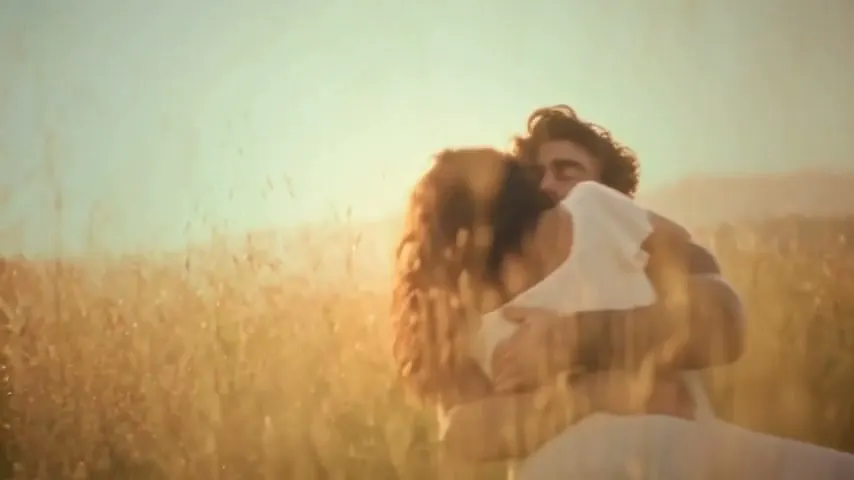
A tense encounter softens into recognition. Then, a memory of life together.
Provided example · 20.74s · 854×480 · Sound availableCurrent generator: 15s · 768P adaptationUse this template
Use this zombie AI video generator to put two familiar faces into a short horror romance, without writing prompts or joining separate shots. Get a 15-second 768P MP4 with scene sound effects. Two fixed roles; 100 credits per attempt, from US$8.90.
Photo 1 stays human. Photo 2 becomes the zombie, then her human self in the memory. Add both portraits and choose your format.
JPG, PNG or WebP · max 4 MB each
A clear portrait of the male character.
JPG, PNG or WebP · max 4 MB each
A clear portrait of the female character.
Use photos you have permission to use. One-time packs, no subscription. Photo privacy · See all prices
A tense encounter. A familiar face. A memory worth keeping.
Provided example at its original length and resolution. Your video is a 15-second, 768P adaptation. Faces, movement, and framing may vary.
Each zombie couple video follows an encounter, an embrace, and a memory. Look at both characters throughout the complete example.
A tense encounter softens into recognition. Then, a memory of life together.
Provided example · 20.74s · 854×480 · Sound availableSee another pair of characters move through the hug and the warm memory.
Provided example · 20.74s · 854×480 · Sound availableThis is a photo-to-video tool: two still portraits become a moving scene with an encounter, a hug and a memory. Your photos supply the faces; the prepared reference supplies the action. You receive one MP4 with scene sound effects, ready to review and download.
Check the cast before uploading: Photo 1 is the male human partner; Photo 2 is the female partner who appears as a zombie, then human. There is no prompt box or footage upload. If you already have a selfie, a filmed clip or a script, use the comparison below to find the input type your idea needs.
Compare input and editing options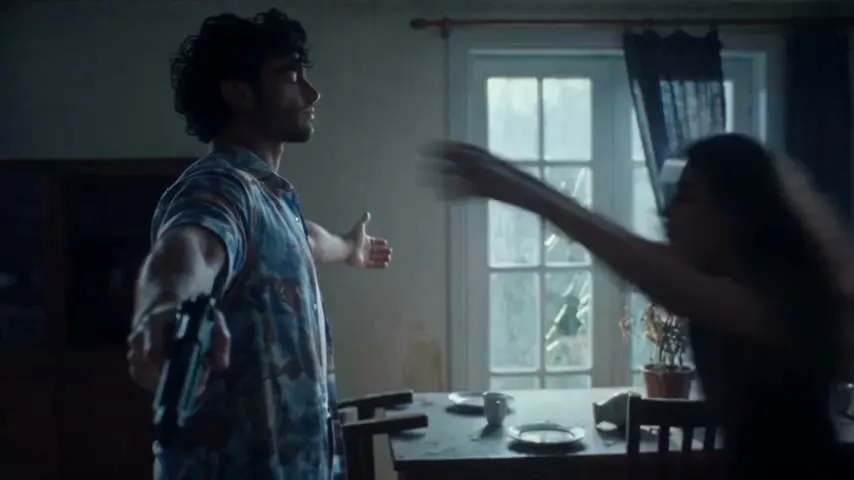
Start with the result you want, then check whether these controls are enough.
Use two separate portraits of people who agreed to appear. The slots assign identities to fixed roles; swapping files does not rewrite those roles.
Review the upload labelsSelect 9:16 for a vertical feed or 16:9 for a wide frame. Duration stays at 15 seconds. Decide first: a second render in another ratio spends another 100 credits.
Check the output and costThe action and scene sound effects are prepared together. There is no scene picker, dialogue field or music selector. You can edit the downloaded MP4 separately.
See the sequence you are choosingAdd one unobstructed face per file. Use JPG, PNG or WebP, up to 4 MB each. Start with ordinary portraits; you do not need to create zombie makeup first.
Choose your frame, sign in and check your balance. Confirm the two portraits before starting the 100-credit generation.
Open the completed task, play the whole clip with sound and save it locally. Review it before adding a caption or sharing it.
Set the faces and composition here. Save captions, titles and your music choice for the downloaded clip. Those finishing touches do not require another AI render, so you can try several edits of one result without spending more generation credits here.
For help choosing usable portraits, follow the detailed photo preparation checklist. Keep your source files handy if you later choose another take.
Suppose you want a 9:16 social post and a 16:9 version for a wider screen, with the action composed for each frame. That is two separate generations: 200 credits in total. Cropping one saved video in an editor avoids a second render, but may cut a person out of the hug. Choose whether new composition is worth another attempt.
For a Halloween post or a horror-romance clip to share together, the zombie AI video generator gives you a defined starting point. Preview the action first so the mood is right for both people.
A solo reveal, pet reunion, different pairing or longer horror trailer needs controls this template does not provide. Start with a shot plan and choose tools that support your references.
Evaluate a zombie AI video generator by the deliverable you will receive, as well as the clip you can preview.
Keep the original MP4 and make edited copies. The choices below require an external editor; they are not controls inside this generator. Your chosen editor may have its own fees.
Place text over a copy of the saved clip. Preview it during the embrace so it does not cover either face. Changing the wording needs no new generation here.
Create the clip to captionThe MP4 includes scene sound effects, not a promised trend song. An editor can lower or replace that audio and add music you have permission to use, without changing the generated faces.
Listen to the supplied examplesAn editor can shorten the clip or crop the frame. It cannot recover action outside that frame. Preview both people throughout the hug before choosing a tighter crop.
Check which workflow fitsText and audio edits leave the generated scene intact. Different portraits require another paid render here; a different plot requires a tool with scene controls. A bigger pack does not add those controls.
Plan a different scene| You have | You want | Does this page fit? | Your next step |
|---|---|---|---|
| Two separate portraits | Your faces in the supplied two-person scene | Yes, if the fixed character roles match | Choose the ratio and upload both photos above |
| One selfie or a pet photo | A solo transformation or an animal character | No; this template requires two human portraits | Find an effect that explicitly supports your subject |
| A video you already filmed | Zombie styling applied to the original action | No; there is no source-video upload | Look for video-to-video editing with footage input |
| A written horror scene | Your own setting, characters and ending | No; the scene instructions are fixed | Use a prompt-based workflow and plan separate shots |
| A finished MP4 from this tool | A new caption, soundtrack or shorter edit | No new generation is needed for those edits | Work on a saved copy in an external editor |
One zombie couple video uses 100 credits. Every pack includes the same 15-second story, 768P download, and sound effects.
Try your first version.
100 credits · $8.90 per generation
Try different portraits or share another story.
500 credits · $4.98 per generation
For creators making several separate videos.
2000 credits · $3.00 per generation
Counts refer to generations, not guaranteed perfect results. Review the full example before buying. Only completely unused credit packs are refundable within 24 hours of purchase. Once any credits from a pack have been used, the entire pack is non-refundable, including its remaining credits. Refund & support rules
Each new render costs 100 credits. Five attempts from the US$24.90 Value Pack work out to US$4.98 each if you use all five. That is a cost per generation, not a promise of five publishable results. A different portrait or ratio starts another paid attempt.
Download promptly: stored media is scheduled for cleanup after 24 hours. If a task fails technically without a deliverable, its generation credits return. For cash refunds and unused balances, read the refund policy before purchasing.
Use the detailed input checklist if you are unsure which photo to choose.
PREVIEWExplore the narrative and transition before putting someone you know into it.
REVIEWFind the next step for a rejected upload, stuck task or unexpected result.
Check inputs, creative limits and downloads before your first attempt.
If the sample fits your idea, bring two portraits to the zombie AI video generator. Check the roles and frame, then create your own 15-second version.
Start with my portraits →